A Clear and Practical Guide to Digital Tools for Trading and Market Operations
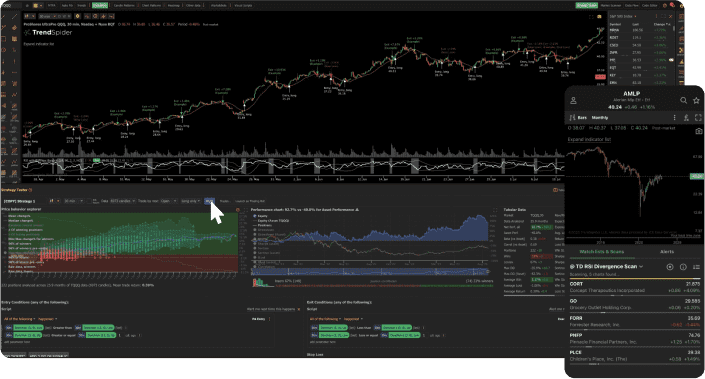
Trade software refers to digital tools and platforms designed to support buying, selling, managing, and analyzing trades across financial markets, commodities, goods, and services. These tools are used by individual traders, businesses, financial institutions, exporters, importers, and logistics teams to streamline trade-related activities and decision-making. As global trade and financial markets become more complex and fast-paced, manual processes are no longer sufficient. Trade software helps users manage transactions, monitor markets, reduce errors, improve compliance, and gain insights from data. From stock trading platforms and risk management systems to import-export management tools, trade software plays a critical role in modern commerce. This guide explains trade software in a user-focused and easy-to-understand way. It covers benefits and limitations, major types and categories, current trends and innovations, key features to consider, leading solution providers, how to choose the right software, best-use tips, frequently asked questions, and a practical conclusion.
Benefits of Trade Software
1. Improved Efficiency
Trade software automates repetitive tasks such as order processing, reporting, and documentation, saving time and reducing manual effort.
2. Better Decision-Making
Access to real-time data, analytics, and insights helps users make informed trading and business decisions.
3. Reduced Errors
Automation and standardized workflows reduce the risk of data entry mistakes and calculation errors.
4. Enhanced Market Visibility
Trading platforms provide up-to-date information on prices, volumes, trends, and market movements.
5. Compliance and Record Keeping
Many trade software solutions support regulatory compliance and maintain audit-ready transaction records.
6. Scalability
Digital systems allow businesses and traders to handle higher trade volumes without proportional increases in staffing.
Limitations of Trade Software
1. Learning Curve
Some platforms can be complex and require training or experience to use effectively.
2. Dependence on Technology
System outages, connectivity issues, or software bugs can disrupt operations.
3. Cost Considerations
Licensing fees, subscriptions, and integration costs may be significant, especially for advanced systems.
4. Data Security Risks
Trade software handles sensitive financial and commercial data, requiring strong cybersecurity measures.
5. Over-Reliance on Automation
Excessive dependence on automated tools without human oversight can increase risk in volatile markets.
Types and Categories of Trade Software
1. Financial Trading Platforms
Used for trading stocks, bonds, derivatives, currencies, and cryptocurrencies.
Common users:
• Individual traders
• Investment firms
Typical functions:
• Order execution
• Market analysis
• Portfolio tracking
2. Commodity Trading Software
Designed for trading physical commodities such as metals, energy products, and agricultural goods.
Common users:
• Commodity traders
• Producers and distributors
3. Import and Export Management Software
Supports international trade operations.
Functions include:
• Documentation management
• Customs compliance
• Shipment tracking
4. Trade Risk Management Software
Helps identify, measure, and manage financial and operational risks.
Used for:
• Hedging strategies
• Credit risk analysis
5. Trade Finance Software
Supports financing activities related to trade.
Functions include:
• Letters of credit
• Invoice financing
• Payment tracking
6. Supply Chain and Trade Operations Software
Integrates trade activities with logistics and inventory management.
7. Algorithmic and Automated Trading Software
Uses predefined rules or algorithms to execute trades automatically.
Comparison Table: Common Trade Software Categories
| Category | Primary Function | Typical Users | Complexity |
|---|---|---|---|
| Financial Trading Platforms | Market trading | Traders, investors | Medium |
| Commodity Trading Software | Physical goods trading | Commodity firms | High |
| Import-Export Software | Trade compliance | Exporters, importers | Medium |
| Risk Management Software | Risk analysis | Financial institutions | High |
| Trade Finance Software | Payment and financing | Banks, businesses | Medium |
| Supply Chain Trade Software | Operations integration | Logistics teams | Medium |
| Automated Trading Software | Algorithm-based trading | Advanced traders | High |
Latest Trends and Innovations in Trade Software
1. Increased Automation
Automation is expanding beyond order execution to include compliance checks, reporting, and reconciliation.
2. Cloud-Based Trade Platforms
Cloud deployment allows easier access, scalability, and reduced infrastructure costs.
3. Artificial Intelligence and Analytics
AI-driven tools support market analysis, anomaly detection, and predictive insights.
4. Real-Time Data Integration
Modern platforms integrate multiple data sources for faster and more accurate decision-making.
5. Enhanced Cybersecurity Measures
Security features such as encryption and multi-factor authentication are increasingly standard.
6. API-Driven Integration
Trade software is designed to integrate with accounting, ERP, and banking systems.
7. Regulatory Technology Integration
Built-in compliance features help users adapt to changing trade and financial regulations.
Key Features to Consider When Evaluating Trade Software
1. Market Coverage
Ensure the software supports the markets, assets, or trade types relevant to your needs.
2. User Interface and Usability
Clear navigation and dashboards reduce training time and user errors.
3. Data Accuracy and Timeliness
Reliable, real-time data is essential for effective trading and operations.
4. Customization Options
Ability to tailor workflows, reports, and alerts improves usability.
5. Integration Capabilities
Compatibility with existing systems enhances efficiency and reduces duplication.
6. Security and Compliance
Strong data protection and regulatory support are critical.
7. Performance and Reliability
System stability and response time affect user confidence and outcomes.
8. Support and Documentation
Access to technical support and learning resources improves long-term value.
Leading Trade Software Providers and Information Platforms
The following companies and platforms are widely known for trade and trading-related software solutions. These links are provided for general information and public reference, not endorsements.
| Company or Platform | Known For | Public Link |
|---|---|---|
| Bloomberg | Financial market data and trading tools | https://www.bloomberg.com |
| Refinitiv | Financial and trade information systems | https://www.refinitiv.com |
| Tradeweb | Electronic trading platforms | https://www.tradeweb.com |
| Nasdaq | Market technology and trading solutions | https://www.nasdaq.com |
| SAP | Trade and supply chain software | https://www.sap.com |
| Oracle | Trade and financial management systems | https://www.oracle.com |
| Eikon | Market analysis and trading tools | https://www.refinitiv.com/en/products/eikon-trading-software |
| MetaTrader | Retail trading platforms | https://www.metatrader4.com |
How to Choose the Right Trade Software
Step 1: Define Trade Objectives
Clarify whether the software is for financial trading, physical trade operations, or trade management.
Step 2: Assess User Skill Level
Choose platforms that match the technical expertise of intended users.
Step 3: Identify Required Markets and Assets
Ensure the software supports relevant instruments and geographies.
Step 4: Evaluate Integration Needs
Consider how the software will connect with existing systems.
Step 5: Review Security and Compliance Requirements
Confirm alignment with regulatory and data protection needs.
Step 6: Compare Costs and Licensing Models
Understand subscription fees, transaction costs, and scaling expenses.
Step 7: Test Through Demos or Trials
Hands-on evaluation helps assess usability and performance.
Selection Checklist for Trade Software
[ ] Trade purpose clearly defined
[ ] Target users identified
[ ] Supported markets confirmed
[ ] Data sources evaluated
[ ] Security features reviewed
[ ] Integration requirements assessed
[ ] Compliance needs verified
[ ] Cost and licensing understood
[ ] Training and support available
[ ] Scalability considered
Tips for Best Use and Management of Trade Software
1. Invest in User Training
Well-trained users are more likely to use features effectively and safely.
2. Start with Core Features
Focus on essential functions before exploring advanced capabilities.
3. Monitor System Performance
Regular checks help identify issues early.
4. Maintain Data Quality
Accurate input data supports reliable outputs and decisions.
5. Review Access Controls
Limit system access based on roles to improve security.
6. Stay Updated
Keep software versions and security patches current.
7. Combine Technology with Human Oversight
Use software as a decision-support tool, not a complete replacement for judgment.
FAQs About Trade Software
1. What is trade software used for?
Trade software supports trading, transaction management, analysis, and compliance.
2. Is trade software only for financial markets?
No. It is also used in commodity trading, import-export operations, and trade finance.
3. Can small businesses use trade software?
Yes. Many solutions are designed for small and medium-sized businesses.
4. Is trade software difficult to use?
Ease of use varies. Some platforms are beginner-friendly, while others require experience.
5. Does trade software replace human decision-making?
No. It supports decisions but should be combined with human judgment.
6. How secure is trade software?
Security depends on the provider and configuration, but most modern systems include strong protections.
7. How often should trade software be reviewed or updated?
Regular reviews ensure continued alignment with business needs and market changes.
Conclusion: A Practical Takeaway
Trade software has become an essential tool in modern trading and commerce, helping users manage complexity, improve efficiency, and make informed decisions. Whether used for financial markets, commodity trading, or international trade operations, these digital systems provide structure and visibility that manual processes cannot match.
By understanding the types of trade software, their benefits and limitations, key features, and selection considerations outlined in this guide, users can make informed choices aligned with their goals and capabilities. When implemented thoughtfully and supported by proper training and oversight, trade software becomes a valuable asset that enhances accuracy, efficiency, and confidence in trading and trade management activities.